How to Prepare Your Logo for Engraved Flasks
To prepare a logo for engraved flasks, send a vector file with outlined fonts, simplify fine details, and plan for a single-tone mark that shows as the flask material itself. Branded Flasks turns that file into a free mockup within 24 hours, so getting the artwork right up front is the fastest way to an approved proof and a flask that looks sharp.
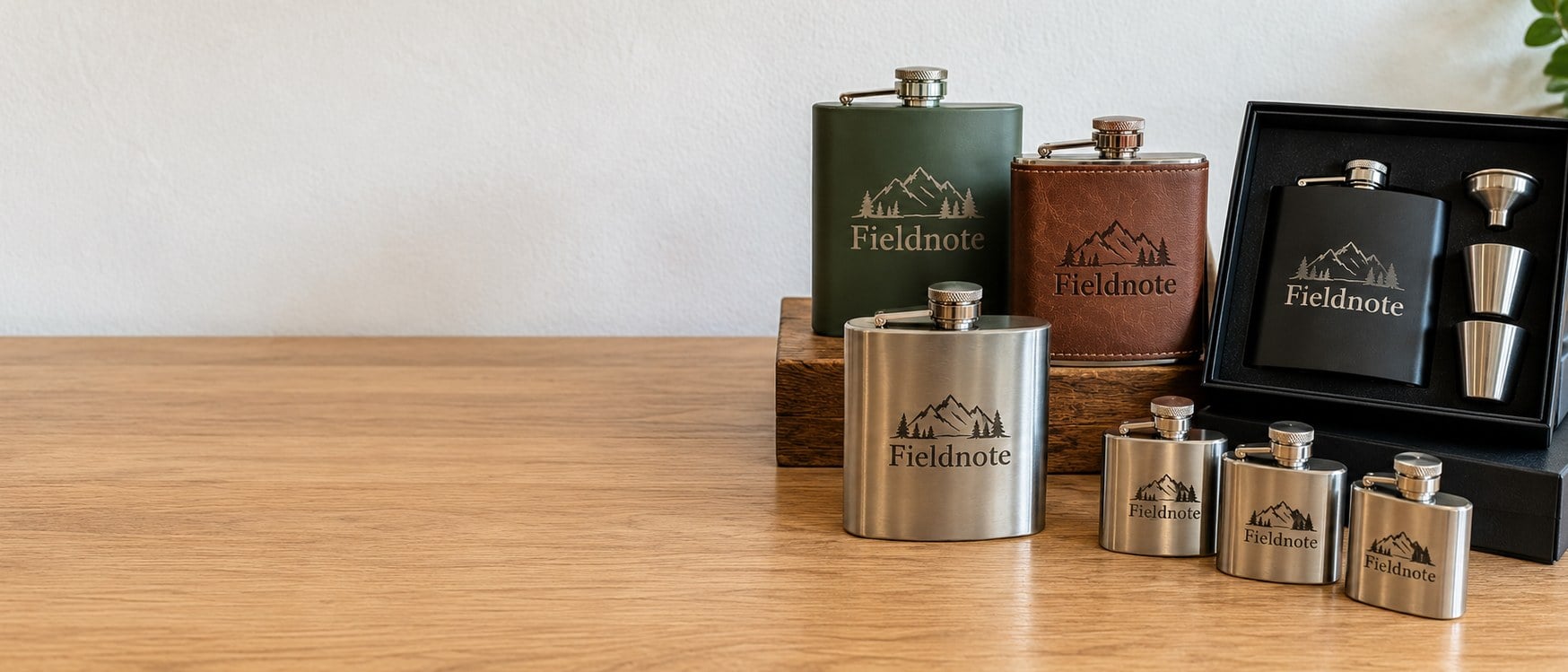
- Vector files such as AI, EPS, SVG or vector PDF engrave cleanest
- Engraving is one tone, so color logos are converted
- Powder-coated flasks give the strongest engraving contrast
- Free mockup within 24 hours with unlimited free revisions
- Pay nothing until you approve the design
What logo file works best for an engraved flask?
The best logo file for an engraved flask is a vector file: an AI, EPS, SVG or a PDF saved from a design program with the artwork kept as shapes rather than pixels. Branded Flasks engraves by tracing lines and filled areas, so a vector file gives the cleanest edges and the most faithful copy of your mark on stainless steel, powder coat or leather.
If your designer or print shop has ever made signs, shirts or packaging for you, they almost certainly have a vector version. Ask for the original working file, not a copy pasted into a slide or document. A high-resolution PNG or JPG can still work for many flask orders, because the art team can redraw a simple mark, but a vector file removes guesswork and usually speeds up the first mockup.
- Best: AI, EPS, SVG or vector PDF with fonts outlined.
- Workable: a large, sharp PNG on a transparent or plain background.
- Hard to use: a logo screenshot, a social media avatar or a photo of a business card.
How does a color logo turn into a one-tone engraving on flasks?
A color logo turns into a one-tone engraving on flasks by converting every color in the design into either engraved or not engraved. Laser engraving does not lay down ink, so the mark appears as the tone of the material underneath: bright brushed metal on stainless, exposed metal on powder coat and a darker burned tone on leather.
That conversion is where most artwork surprises happen. Gradients, drop shadows and two colors of similar brightness can merge into one shape once the color is gone. A logo that relies on a red word next to a blue word may need a thin outline or a little extra spacing so the two parts stay distinct. The Branded Flasks mockup shows exactly how your logo reads in a single tone before anything is engraved, which is why approving the proof matters more than approving the original file.
If you want color to come through, a powder-coated flask lets the coating carry your brand color while the engraving supplies the contrast.
Which flask finish shows engraved artwork most clearly?
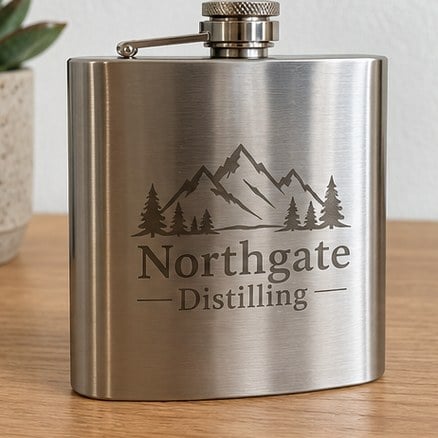
Powder-coated flasks usually show engraved artwork most clearly, because the laser removes the colored coating and reveals bright metal beneath, which creates strong contrast. Stainless steel flasks give a subtle, tone-on-tone mark that reads as refined rather than loud. Leather-wrapped flasks produce a warm, darker impression that suits traditional crests and script.
| Flask finish | How the engraving looks | Artwork that suits it |
|---|---|---|
| Stainless steel | Light, frosted mark on brushed metal | Bold wordmarks and simple icons |
| Powder-coated | Bright metal showing through the color | Detailed logos and small text |
| Leather-wrapped | Darker impression in the leather | Monograms, crests and script names |
| Insulated | Depends on the outer finish chosen | Clean marks that read at a glance |
| Mini | Same as its finish, on a smaller area | Short names and simplified icons |
Compare options on the stainless steel, leather-wrapped and insulated flask pages before you finalize artwork, since the finish should shape how bold the design needs to be.
How much detail can a small flask engraving hold?
A flask engraving holds less fine detail than a printed brochure, because the engraving area on a flask face is compact and the mark is one tone. Thin hairlines, tiny taglines and dense texture are the elements most likely to fill in or disappear, especially on leather and on mini flasks, where the area is smaller still.
A practical test is to shrink your logo on screen to roughly the size of a playing card and look at it from arm’s length. Anything you cannot read at that size will be hard to read on the flask. The usual fixes are simple: drop a long tagline, thicken thin strokes slightly, or use a stacked or icon-only version of your logo. Many brands already have a compact version for social profiles or favicons, and that version often engraves beautifully.
- Remove the tagline or move it to the back of the flask.
- Use the icon alone for mini flasks.
- Avoid outlines that are thinner than the letters around them.
Can you engrave both sides of a flask with different artwork?
Branded Flasks can engrave both sides of a flask with different artwork, which is a popular way to keep the front clean while still adding a message. A common layout puts the company logo or monogram on the front and a date, event name, short message or personal name on the back.
Treat the two sides as separate pieces of artwork. Send the front logo as one file and type the back text exactly as you want it to appear, including capitalization and punctuation. If the back carries a different name on each flask, send the names as a single spreadsheet column rather than in an email thread, and double-check spelling before submitting. Every name gets engraved exactly as written, so a spreadsheet you have proofread is the best protection against a misspelled gift.
Personalized backs are especially common with custom flask gift sets for wedding parties, retirements and award programs.
What are the most common artwork mistakes on flask orders?
The most common artwork mistakes on flask orders are low-resolution files, unoutlined fonts, logos that depend on color, and text that is too small to read once engraved. Each one is easy to fix before the mockup stage and much harder to fix once a deadline is close.
- Sending a screenshot. Pixels from a website or slide look fine on screen but blur when enlarged for engraving.
- Leaving fonts live. If the art team does not have your font, the text may be substituted. Outline or embed fonts before sending.
- Relying on color contrast. Two colors that look distinct can become one shape in a single-tone engraving.
- Overloading one face. Logo, tagline, website and phone number on a hip flask face compete with each other.
- Unchecked name lists. A typo in the spreadsheet becomes a typo in the metal.
- Approving the proof too quickly. Read every word on the mockup, not only the logo.
How does the Branded Flasks proof and approval process work?
The Branded Flasks proof process starts when you submit your logo and flask choice through the quote form, and a free digital mockup comes back within 24 hours. The mockup shows your artwork placed on the actual flask style and finish you picked, so you can judge size, position and contrast before production.
Revisions are unlimited and free. You can ask for the logo larger or smaller, a different layout, a back-side message or a switch to another finish, and a fresh mockup follows each change. You pay nothing until you approve the design, which means you can compare two finishes or two logo versions without committing to either.
- Send your file and flask style through the custom quote form.
- Review the mockup within 24 hours.
- Request changes until the layout is right.
- Approve, and standard production takes about 2 weeks.
The full sequence is laid out on the how it works page.
What should you send with your artwork to get a fast mockup?
To get a fast mockup on custom flasks, send your artwork together with the flask style, the finish or color, the side or sides you want engraved, any text for the back, and your delivery date. A complete request lets the Branded Flasks art team build the right mockup on the first pass instead of asking follow-up questions.
It also helps to say who the flasks are for. A distillery tasting room, a corporate client gift and a groomsmen set often call for different logo versions and layouts, and a sentence of context shapes the first proof. Craft spirits brands can see examples of how labels and marks translate to metal on the custom flasks for distilleries page.
- Logo file, vector if available.
- Flask style and finish.
- Front, back or both.
- Exact back text or a proofread name list.
- Quantity and the date the flasks need to arrive.
Frequently asked questions
Can I send a logo saved as a PDF for engraved flasks?
A PDF works well for engraved flasks when it was exported from a design program and still contains vector shapes. A PDF that simply wraps a photo or screenshot behaves like a low-resolution image. Branded Flasks checks every file on arrival, and the art team will tell you within the mockup window if a cleaner version would produce sharper edges on the flask.
Do I need to outline fonts before sending flask artwork?
Outlining fonts before sending flask artwork is strongly recommended, because it turns letters into shapes that cannot be swapped for a different typeface. If you cannot outline them, include the font files or name the fonts in your request. Either way, read the wording on your mockup carefully, since the proof shows exactly what the engraver will follow.
Will my brand colors appear in an engraved flask logo?
An engraved flask logo appears in one tone, the color of the material revealed by the laser, so ink colors from your logo do not carry over. To bring brand color into the design, choose a powder-coated flask in a shade close to your palette. The engraving then shows as bright metal against that colored coating.
Can a hand-drawn sketch be turned into flask engraving artwork?
A hand-drawn sketch can often become flask engraving artwork if the lines are clear and photographed straight on in good light. Simple drawings, signatures and family crests usually convert well, while shaded pencil work is harder. Branded Flasks will show the converted result in your free mockup so you can judge it before approving anything.
Is a signature a good choice for engraving on a flask?
A signature engraves nicely on a flask when it is written in a dark pen with steady, medium-weight strokes. Very thin or faint signatures can lose detail at flask size. Sign several times on plain white paper, pick the clearest version, scan it at high resolution and send it with a note about which side it should go on.
Should a mini flask use a simpler logo than a full-size flask?
A mini flask usually benefits from a simpler logo than a full-size flask, because its engraving area is smaller and fine details have less room. The icon portion of your brand, a monogram or a short wordmark tends to read best. Branded Flasks can mock up both your full logo and a simplified version so you can compare them side by side.
Can I approve one flask mockup for several finishes at once?
One flask mockup can be adapted across several finishes, but each finish deserves its own proof because contrast changes on stainless steel, powder coat and leather. Branded Flasks can prepare a mockup for every style in your order. Reviewing them together helps you confirm that the same logo size and layout look right on each material.
What happens if my flask artwork has a white background box?
Flask artwork with a white background box may engrave the box itself if the file is used as is, which looks like a solid rectangle around your logo. The art team removes backgrounds during mockup preparation, and the proof will show the cleaned result. Sending a transparent PNG or a vector file avoids the issue from the start.
Can my flask engraving include a website address or social handle?
A flask engraving can include a website address or social handle, usually on the back so the front logo stays clean. Keep it short and check spelling closely, since every character is engraved as typed. On mini flasks, a handle may crowd the space, so Branded Flasks may suggest placing it alone on the reverse side.
How do I check a name list before it goes onto engraved flasks?
Check a name list for engraved flasks by putting every name in one spreadsheet column, sorting it, and reading it aloud against the original source. Confirm capitalization, nicknames and accented letters with each recipient if possible. Branded Flasks engraves names exactly as supplied, so a careful review before approval is the surest way to avoid a reorder.
Can engraved flask artwork include a date in Roman numerals?
Engraved flask artwork can include a date in Roman numerals, a popular touch for weddings, anniversaries and company founding years. Write the numerals exactly as you want them and double-check the conversion, because the engraving follows your text character for character. Branded Flasks shows the date on your free mockup so you can confirm spacing and placement.
Get a free mockup for your flasks
Send your logo or idea and the quantity you have in mind. Branded Flasks returns a free mockup within 24 hours, you approve the design before anything is produced, and standard turnaround is about two weeks with faster options available. Get a custom quote.
Win Free Stuff
Enter below for a chance to win plus receive 10% off your first order.
🎉 You are in!
We will text you your 10% off code. Good luck!